
The Ontario Job Grant (OJG) offers employers an opportunity to train and invest in their workforce with support from the Ontario government. The grant provides direct financial support to eligible Ontario employers who wish to purchase training for their employees, both incumbents and new hires. The grant is available to small dental practice with less than 99 employees and larger practices with over 100 employees.
Here’s the complete, step-by-step guide for applying to the Ontario Job Grant for staff training funding.
1. Complete the eligibility questionnaire
To apply for the Ontario Job Grant, start by completing the initial eligibility questionnaire here.
Please Note: Pay attention to these questions when completing the questionnaire
Are you requesting funding for training required by law? – No
Are you able to provide three training quotes? – Yes

Click “Continue” to proceed to the Employer Application Form. On the Employer Application Form, scroll to the bottom of the page and click “Apply Now”

2. Complete the Employer Application Form
You are required to complete 8 steps to submit the employer application form.
Here are the important instructions:
Submission Instructions
- OJG applications must be submitted by the Employer but may seek/obtain training providers input to assist in the completion of the application.
- The application session ends after 30 minutes of inactivity. Please ensure to save your data to prevent loss due to time-out.
Information Required to fill out the form:
To fill out the employer application form, please have the following ready:
i. Employer contact information, including:
- Contact name
- Employer details (business name, address, number of employees, and year business registered)
- Canada Revenue Agency number
ii. Contact information of your training provider(s), including:
Dental Training Canada will be one of your three quoted providers. We will assist you in identifying comparable training providers for the courses you’re interested in.
- First, second, and third-choice training provider
- Details of training costs, including:
- Tuition and any other training provider fees
- Mandatory student fees
- Examination fees
- Cost of textbooks, software, and other required materials
- Travel cost for incumbent employees and/or new hires
- Training Support for Persons with Disabilities
- Details of training costs, including:
- Canada Revenue Agency number of your first-choice training provider
iii. Training details, including:
- Number of incumbent employees to be trained
- Number of new hires to be trained
Ontario Job Grant: Step By Step Application Guide For Employers
Step 1: Complete Application Questions
a. Complete your application questions by selecting all required fields

b. Provide details of your workplace insurance and select all checklist items

c. Complete your attestation details
Fill the required fields and click “Continue” to proceed to the next page.

Step 2: Complete the Employer Information Fields
a. Complete the general information and contact information fields

Complete the alternate information field if you wish to include another entity within your organization to be contacted regarding your Ontario Job Grant application.
b. Complete the corporate address & business communication fields

c. Complete the employer details field

Tip: For the Type of Sector question, select “Healthcare and Social Assistance.” Click Continue to proceed.
NOTE: Please ensure to enter correct information for your dental practice. The information pre-filled in the sample screenshot below is solely for demonstration purposes.
Step 3: Complete Training Questions
a. Complete training questions
Under the “Describe the specific workforce need this training addresses for the employees who will participate. Include the relevant job duties and the skills this training will develop, and explain how these skills directly support your organization’s operational need. (maximum 500 characters),” enter the following:
If you’re applying for the HARP1 Dental Radiography course: “There is a shortage of dental staff that can take X-rays. Having more HARP-certified staff will help increase our capacity to deliver better care to more patients.”
If you’re applying for the Dental Support Worker Foundation Course: “There is a shortage of skilled staff that can perform specific dental office tasks. This foundation training provides existing and new staff members the necessary foundations to work dynamically in the front and back offices.”


b. Provide staff/trainee details

Click “Add Incumbent Employees” after adding each employee detail.
Select “Yes” if you are requesting training for new hires, otherwise, select “No”
c. Complete the training outcomes section

Click “Continue” after completing the section above.
Note: All questions are required.
Step 4: Provide Training Providers’ Details
a. Enter training provider details and address


For training address:
Guelph:
101 Westmount Rd, Guelph, ON N1H 5J2
Phone number: 866-496-5080
Email: info@dentaltrainingcanada.com
North Bay:
60 Champlain St. Suite 202, North Bay, ON P1B 7M4
Phone number: 866-496-5080
Email: info@dentaltrainingcanada.com
Woodbridge:
211 Marycroft Ave Unit 1A, Woodbridge, ON L4L 5X8
Phone number: 866-496-5080
Email: info@dentaltrainingcanada.com
Thunder Bay:
777 Red River Rd, Thunder Bay, ON P7B 1J9
Phone number: 866-496-5080
Email: info@dentaltrainingcanada.com
North York:
78 Finch Ave E B1, North York, ON M2N 7J5
Phone number: 866-496-5080
Email: info@dentaltrainingcanada.com
Kingston:
1065 Midland Ave, Kingston, ON M1K 4G8
Phone number: 866-496-5080
Email: info@dentaltrainingcanada.com
Aurora:
14785 Yonge Street, Unit 107, Aurora, ON L4G 1N1
Phone number: 866-496-5080
Email: info@dentaltrainingcanada.com
b. Provide course information
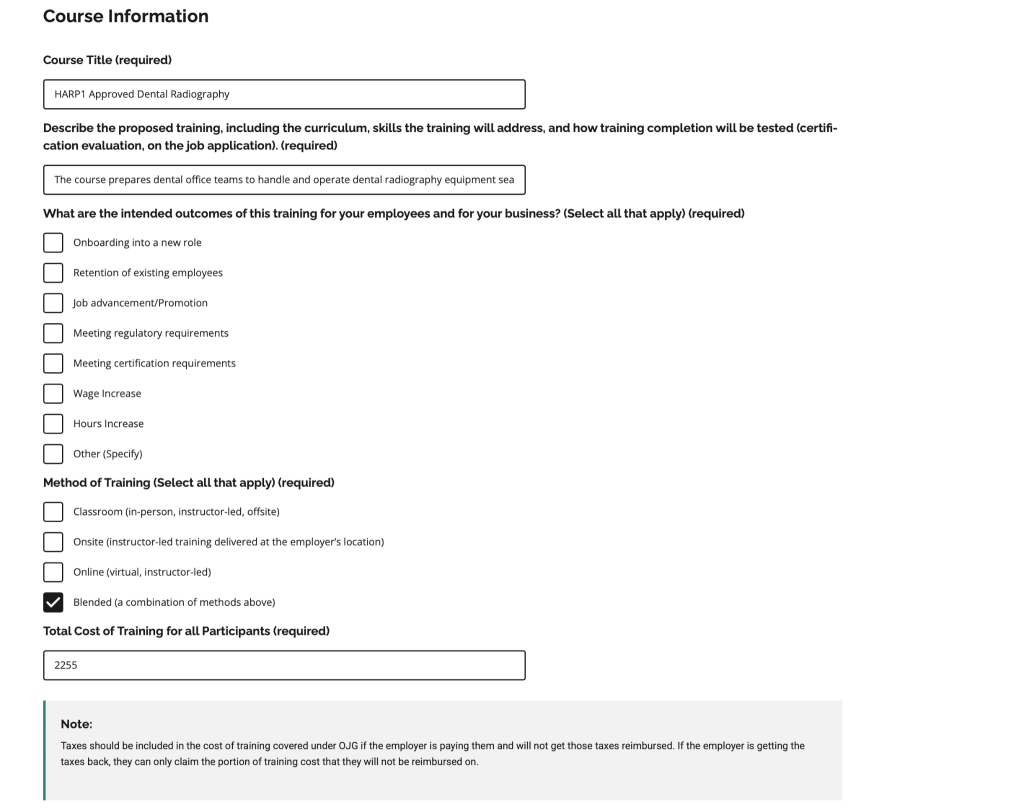
Template for answering the “Describe the proposed training, including the curriculum, skills the training will address, and how training completion will be tested (certification evaluation, on the job application). (required)” field:
For HARP1 Approved Dental Radiography: “The course prepares dental office teams to handle and operate dental radiography equipment seamlessly, covering core principles of Radiation, ALARA, and more.”
For Dental Support Worker Foundations: “This foundation course polishes new hires with zero dental background, accelerating their on-the-job knowledge of basic dental support while also positioning them for full integration within dental offices.”
c. Enter the total cost of training
The total cost of training for Dental Training Canada courses is $2255
d. Enter your training schedule
For your training schedule, select your Start date as 3 weeks from the OJG application submission date and End date to be 8 weeks from start date.

Repeat steps 4a – 4d for all 2 other training providers whose quotes you have obtained.
Step 5: Provide Details of Training Cost and Grant Request
a. Provide the cost details of training

Click “Continue” to proceed to the next step.
Step 6: Review application entries
Carefully review all entries you have provided as part of your application. If all is correct, click “Continue” to proceed to step 7.
Step 7: Complete Declaration and Signature
Complete the declaration form and click “submit application” to complete your Ontario Job Grant application process.
